(In the previous series of posts on Insertion Sort, we looked at the working of the algorithm on simple example, and also analysed its running time.)
Some more details about Insertion Sort
It is an in-place sorting algorithm, (That is, we don’t create a new temporary array, or anything like that. We rearrange the elements within the same input array itself, and use only O(1) extra space.)
It is a stable sorting algorithm. (That is, the relative order of equal elements is maintained in the sorted array.) (This is because, in any pass, we shift an element to the right (and bring the key to the left) only if the key is smaller than that element. If the key is equal value, we leave the key there itself. We don’t do any further shifting or rearranging in that pass.)
When is Insertion Sort useful? Answer: When the array size is fairly small, or when the array is already almost sorted.
Pseudo-code for Insertion Sort
Input: Array A [1 … n] having n elements indexed from 1 to n. Output: Sorted Array A .
Algorithm:
//there are n-1 passes in all
For index i going from 2 up to n:
          key <-- A[i]. // set the key in each pass.
          // compare key backwards and insert at appropriate position.
          // compare as long as key is smaller, or until we reach the
          // very beginning of the array.
          j <- (i-1).
          while (j >= 1) AND (key < A[j])
                        A[j+1] <- A[j] //shift A[j] to the right.
                        j <- (j-1)     //go backward.
         //we've found appropriate position to insert the key. Insert it.
         A[j+1] <- key.
Above is the pseudo-code for Insertion Sort. This is the same algorithm that we had explained in text earlier, and looked at examples for. One subtle point: In the while condition: We’ve written: while (j >= 1) AND (key < A[j]) What if we instead wrote: while (key < A[j]) AND (j >= 1) This 2nd version could potentially create problems. Because it may try to check the value of A[j] even at an index that is non-existent. So, it is proper to first check the index and then do the key value comparison.
Here’s the insertion sort algorithm summarised in simple words:
In any pass, there is a sorted subarray on the left, and a key. The task is to insert the key into the appropriate position in that sorted subarray. (In order to do so, we make comparisons, and shift some elements to the right.)
At the end of each pass, the sorted subarray grows by one element,
Pass 1: Key is the 2nd element. And the sorted subarray consists of just the 1st element of the array.
Final Pass: Key is the last element (A[n]), and sorted subarray contains (n-1) elements. When that key also gets inserted, the entire array gets sorted, and the algorithm terminates.
How many passes are there in all? Answer: n-1.
Running time analysis of Insertion Sort
Total number of passes (for array having n elements) is n – 1. In each pass:
need to compare key with elements of sorted subarray
And, insert key at appropriate position.
Best-case running time:
Let’s assume the input array is already sorted.
For example: A - 10 | 14 | 25 | 27 | 50.
In each pass, we’ll select a key. We’ll compare key with last element of sorted subarray. Key is already in its appropriate position. No more comparisons, or shifting needed.
For example, in Pass 2 for the above array:
key would be 25.
sorted subarray would be 10 , 14.
25 > 14.
No need to do any more comparisons in this pass. And no need to do any shifting of elements.
Similar is the case with other passes too.
Running time:
O(1) [constant time] in each pass.
O(n) passes in all
Hence, O(n) is best-case running time.
Worst-case running time
Let’s assume that the array is reverse-sorted.
E.g. A : 50 | 34 | 22 | 18 | 5
Total (n-1) passes as usual.
In each pass, key will need to be inserted at appropriate position in sorted subarray.
Let’s take Pass 2.
Key is 22.
Sorted subarray is 34, 50.
22 < 50. Hence, shift 50 to the right.
22 < 34. Hence, shift 34 to the right.
And insert 22 at the beginning of the array.
Similarly, in each pass, the key would need to be inserted at the beginning of the array. All the elements of the sorted subarray in each pass will need to be compared and shifted. This holds true for every pass in our reverse-sorted input example.
Total number of comparisons/shiftings that we do is something like: 1 + 2 + 3 + … + (n-1), which is O(n^2).
Hence, worst-case running time is O(n^2).
Average-case running time is also O(n^2).
In the next post, we shall look at a few more details related to Insertion Sort, and look at its pseudo-code.
Earlier (in Part 1), we were introduced to Insertion Sort, and looked at an example to understand it. Here’s the same array example with a nice visualization.
Initially, only the first element is considered sorted.
10
6
8
20
14
9
[1]
[2]
[3]
[4]
[5]
[6]
Pass 1 — Key = 6Step 1: Choose key 6
Take 6 as the key.
10
6
8
20
14
9
[1]
[2]
[3]
[4]
[5]
[6]
Step 2: Compare 6 with 10
Since 10 > 6, 10 must be shifted to the right.
10
6
8
20
14
9
[1]
[2]
[3]
[4]
[5]
[6]
Step 3: Shift 10 to the right
10 is shifted one position to the right. The key 6 is being held separately.
10
10
8
20
14
9
[1]
[2]
[3]
[4]
[5]
[6]
Step 4: Insert 6
Insert the key 6 at index 1. Now the first two elements are sorted.
6
10
8
20
14
9
[1]
[2]
[3]
[4]
[5]
[6]
Pass 2 — Key = 8Step 1: Choose key 8
Take 8 as the key.
6
10
8
20
14
9
[1]
[2]
[3]
[4]
[5]
[6]
Step 2: Compare 8 with 10
Since 10 > 8, shift 10 to the right.
6
10
8
20
14
9
[1]
[2]
[3]
[4]
[5]
[6]
Step 3: Shift 10
10 is shifted right. Continue comparing the key 8 backwards.
6
10
10
20
14
9
[1]
[2]
[3]
[4]
[5]
[6]
Step 4: Compare 8 with 6
Since 6 < 8, stop shifting.
6
10
10
20
14
9
[1]
[2]
[3]
[4]
[5]
[6]
Step 5: Insert 8
Insert 8 between 6 and 10. Now the first three elements are sorted.
6
8
10
20
14
9
[1]
[2]
[3]
[4]
[5]
[6]
Pass 3 — Key = 20Step 1: Choose key 20
Take 20 as the key.
6
8
10
20
14
9
[1]
[2]
[3]
[4]
[5]
[6]
Step 2: Compare 20 with 10
Since 10 < 20, no shifting is needed.
6
8
10
20
14
9
[1]
[2]
[3]
[4]
[5]
[6]
Step 3: 20 stays in place
20 is already in the correct position. Now the first four elements are sorted.
6
8
10
20
14
9
[1]
[2]
[3]
[4]
[5]
[6]
Pass 4 — Key = 14Step 1: Choose key 14
Take 14 as the key.
6
8
10
20
14
9
[1]
[2]
[3]
[4]
[5]
[6]
Step 2: Compare 14 with 20
Since 20 > 14, shift 20 to the right.
6
8
10
20
14
9
[1]
[2]
[3]
[4]
[5]
[6]
Step 3: Shift 20
20 moves one position to the right. Continue comparing 14 backwards.
6
8
10
20
20
9
[1]
[2]
[3]
[4]
[5]
[6]
Step 4: Compare 14 with 10
Since 10 < 14, stop shifting.
6
8
10
20
20
9
[1]
[2]
[3]
[4]
[5]
[6]
Step 5: Insert 14
Insert 14 between 10 and 20. Now the first five elements are sorted.
6
8
10
14
20
9
[1]
[2]
[3]
[4]
[5]
[6]
Pass 5 — Key = 9Step 1: Choose key 9
Take 9 as the key.
6
8
10
14
20
9
[1]
[2]
[3]
[4]
[5]
[6]
Step 2: Compare 9 with 20
Since 20 > 9, shift 20 to the right.
6
8
10
14
20
9
[1]
[2]
[3]
[4]
[5]
[6]
Step 3: Shift 20
20 shifts to the right.
6
8
10
14
20
20
[1]
[2]
[3]
[4]
[5]
[6]
Step 4: Compare 9 with 14
Since 14 > 9, shift 14 to the right.
6
8
10
14
20
20
[1]
[2]
[3]
[4]
[5]
[6]
Step 5: Shift 14
14 shifts right. Continue comparing 9 backwards.
6
8
10
14
14
20
[1]
[2]
[3]
[4]
[5]
[6]
Step 6: Compare 9 with 10
Since 10 > 9, shift 10 to the right.
6
8
10
14
14
20
[1]
[2]
[3]
[4]
[5]
[6]
Step 7: Shift 10
10 shifts right. Continue comparing 9 backwards.
6
8
10
10
14
20
[1]
[2]
[3]
[4]
[5]
[6]
Step 8: Compare 9 with 8
Since 8 < 9, stop shifting.
6
8
10
10
14
20
[1]
[2]
[3]
[4]
[5]
[6]
Step 9: Insert 9
Insert 9 after 8. The array is now fully sorted.
6
8
9
10
14
20
[1]
[2]
[3]
[4]
[5]
[6]
Final Sorted Array: 6, 8, 9, 10, 14, 20 Main idea: Take the next element as the key, compare it backwards with the sorted portion, shift larger elements right, and insert the key in its correct place.
sri ramanuja seva
In the next post, we shall summarise the Insertion Sort algorithm in simple terms, and also analyse its running time.
Earlier we saw how to insert a value into an array (basically, shift elements to the right starting from the last element, and insert the value at the appropriate position). We also saw a simple algorithm for sorting an array, namely Selection Sort, where we basically keep selecting the minimum from the unsorted portion of the array and keep bringing to the start of that portion.) Here, we shall look at another simple, common algorithm for sorting the elements in an array, known as Insertion Sort. We keep inserting subsequent elements at appropriate positions in a growing sorted subarray. Hence, its named as Insertion Sort.
(In the following series of posts on Insertion Sort, we shall look at how insertion sort works to sort arrays, we’ll try to understand the algorithm more, and also analyse its running time, and look at its pseudo-code. Here’s Part 1 of the series.)
Let’s take this as our initial array:
A: 10 | 6 | 8 | 20 | 14 | 9
The array contains 6 elements as shown above. Our task is to sort it in non-descending order. (Non-descending is the same as ascending order. It means that a subsequent element should not be smaller than a previous element. Equal value elements are allowed to be together in any order.) Let’s assume that the array elements are indexed as A[1] through A[6].
We build the sorted array element-by-element.
Initially, we assume that the array contains just one element – just the 1st element (A[1]). There is nothing to sort. This is the initial pass.
In the next pass (Pass 1), we consider A[2]. We call this as the key for this pass. (In our example, the key or A[2] is 6.)
The array under consideration now contains 2 elements – A[1] and A[2].
We compare the key with A[1], which is 10.
Key is smaller. So, we shift 10 to the right by one position, and we insert the key before it.
Hence, at the end of Pass 1, the 1st two elements of array A are in sorted order (as 6 and 10 )
Array A at the end of Pass 1:
A: 6   |   10    |    8    |    20    |    14    |    9
Pass 2: We take the 3rd element (A[3]), which is 8 as the key for this pass.
The 1st two elements (A[1] and A[2]) are already in sorted order.
Our task is to insert the key into its appropriate sorted position among A[1] and A[2].
Compare key with A[2]. Key (8) is smaller than A[2] (10). Hence, shift A[2] to the right by one position.
Now, compare key with A[1]. Key (8) is greater than A[1] (6). Hence, no need to shift further. Keep A[1] where it is, and insert key at A[2].
Hence, at the end of this pass, the 1st three elements of A are in sorted order ( 6 , 8 , 10).
Array A at the end of Pass 2:
A: 6   |   8    |    10    |    20    |    14    |    9
Pass 3: We take the 4th element (A[4]) as the key. A[4] is 20.
our task is to find the appropriate position for 20 in sorted subarray (A[1] through A[3]) and insert it there.
Compare 20 with A[3] (10). Key is greater. No need to do any shifting, or any more comparisons in this pass. Key is already in its appropriate position.
Array A at the end of Pass 3:
A: 6   |   8    |    10    |    20    |    14    |    9
Pass 4: We take the next element, A[5] (14) as the key. We compare backwards, shift greater elements, and insert 14 in its appropriate position in the sorted subarray to its left.
Then, in Pass 5, the final pass, we take 9 as the key, and insert that too into its appropriate position in the sorted subarray to its left. Once that is done, our array is completely sorted, and we are done.
In the next post, you can see a nice visual representation of the example that we just saw. Insertion Sort – Part 2.
Above verse is spoken by Sri Narada to little Dhruva, in Srimad Bhagavatam (Canto 4). Naradar tells Dhruva a nice formula by which we can lead a happy, peaceful, serene life. We come across various people in our daily interactions. How to properly deal with them? Naradar answers that question.
गुण-अधिकात् मुदम् लिप्सेत् When we come across those who are more qualified or more advanced than us, we should be happy and pleased to receive them. (That is, one should not feel envy or animosity towards those more advanced than us.)
अनुक्रोशम् गुण-अधमात् To those who are less qualified than us, we should feel compassion. (That is, we should not have a condescending or deriding attitude towards them.)
मैत्रीम् समानाद् अन्विच्छेत् Towards those who are equal to us, we should seek friendship. (That is, we should not get into a competitive mood of rivalry, and try to outdo them.)
न तापैः अभिभूयते If one follows the above formula for dealing with various people, then one will not become overcome by the miseries of life, or by distress.
(In this context, Dhruva was in a very miserable, angry, distressed state having been insulted by a relative. Naradar tries to pacify him and give him a devotional and spiritual outlook to things.)
By one’s past karma, one gets to obtain different kinds of happiness and distress. One should remain serene in all such situations. Should not get disturbed. This is also the teaching given in Bhagavad Gita.
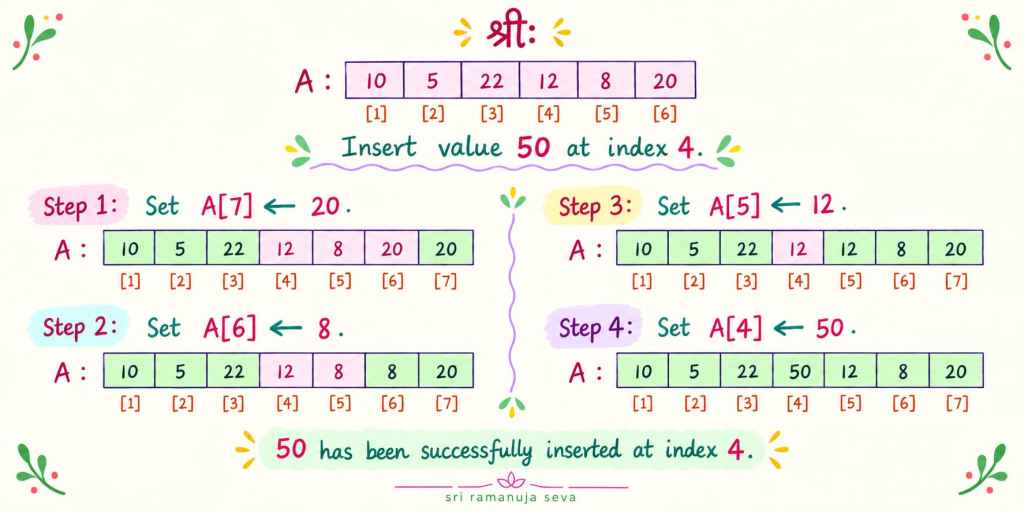
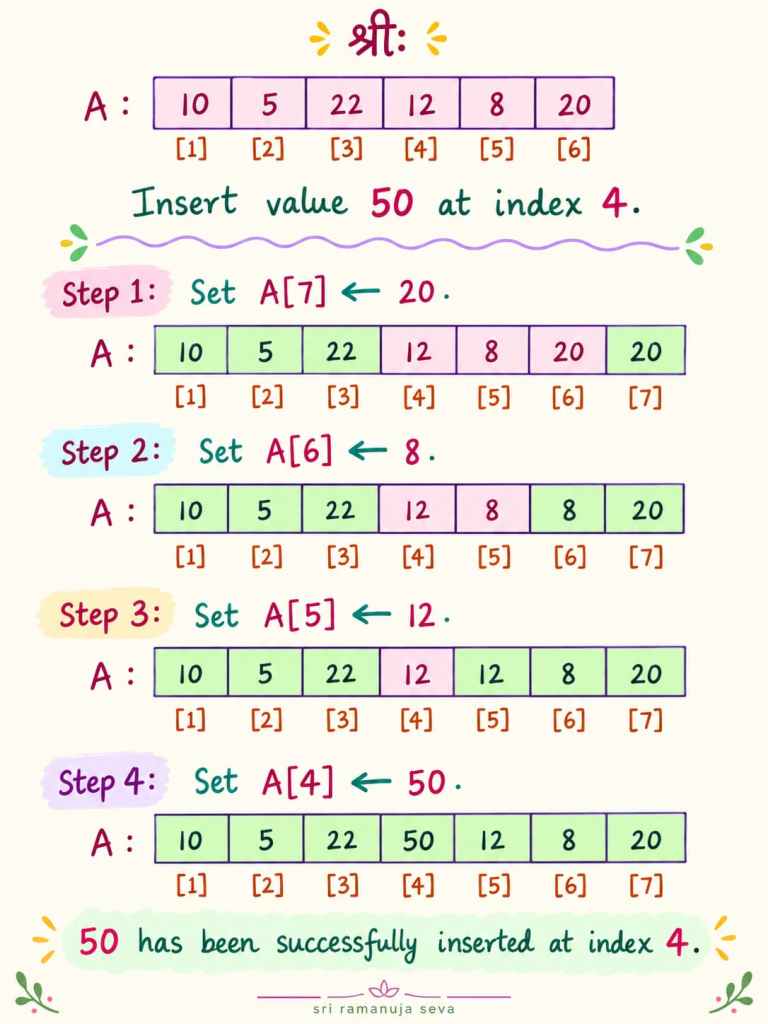
The array has 7 elements as shown above. Let’s say we want to insert an element into the array. Let’s say we want to insert the value 50 at index (position) 4. So, in essence, we want the array to be:
|__20__|__4__|__25__|__50__|__10__|__3__|__22__|__16__| [1] [2] [3] [4] [5] [6] [7][8]
What did we do above?
Value 50 was inserted at index 4.
The elements which were originally at indices 4 though 7 were all shifted one position to the right. (That is, earlier 10 was at index 4. Now, 10 goes to index 5. Similarly, earlier, 3 was at index 5. Now, 3 is at index 6. Similarly, earlier 22 was at index 6. Now, 22 is at index 7. And again, 16 was at index 7. Now, it goes to index 8. )
(Value 2 has been inserted at position 5, and the elements to the right of it have been shifted right by one position each.)
Our task is to develop a simple algorithm to perform the above task.
Input: (1) Array A[1…n] having n elements, indexed from 1 to n. (2) value v, which is to be inserted at index k. (Note: its quite common to have indices go from 0 to n-1. But, for sake of convenience, we are having the indices go from 1 to n. This is also fine.)
In essence, we need to do 2 things:
Set the value of A[k] to be v. That is, A[k] <– v.
Shift all elements at indices k through n, one position to the right. (That is, as we saw in the examples above, the elements which follow the inserted value are all to be shifted by one position.)
Let’s take the 1st example we saw above, and try to do the above 2 steps, and see if it works:
But, we encounter a problem here. The value which was earlier at index 4, (that is, the value 10) has been overwritten. That value is lost, it is no longer available to us. Solution: Before setting A[4] as 50, we should store the original value of A[4] somewhere. Then this problem won’t arise.
We know that 10 should go to A[5] in the modified array. So, why not store the value 10 at A[5] itself. And then we can assign A[4] to be 50, and we won’t have a problem. Le’ts see:
Original Array A : |__20__|__4__|__25__|__10__|__3__|__22__|__16__|
                      [1]   [2]    [3]    [4]   [5]    [6]    [7]
But again, there’s a problem with this approach. The original value at A[5] (which was the value 3) has been lost. It has been overwritten by 10. Solution: Before we set A[5] as 10, we need to safely store the value of A[5] somewhere. Then, we can assign the value 10 to A[5].
We know that what was originally at A[5] should go to A[6[ in the modified array.
Original Array A : |__20__|__4__|__25__|__10__|__3__|__22__|__16__|
                      [1]   [2]    [3]    [4]    [5]   [6]    [7]
So, let’s do that: A[6] <– 3. (Then we can set A[5] as 10, and after that, we can set A[4] as 50.)
But, again, on the same lines of the problems we encountered earlier, the original value of A[6] (that is, the value 22) should not get lost. Solution: we’ll store it in A[7], and then we’ll assign the value 3 to A[6].
So, A[7] <– 22 We’ve set A[7] to have the value 22. (Now, we are free to set A[6] to be 3, and then, A[5] to be 10, and then A[4] to be 50. ]
But, again, as we saw earlier, the original value of A[7] (the value 16) needs to be safely stored before we can assign a new value to A[7]. We know that 16 should be at index 8 in the modified array. Let’s set A[8] to be 16. A[8] <– 16. The originally value of A[7] is safely stored at A[8]. So, we can set a new value at A[7]. A[7] <– 22. (22 was earlier at A[6]. Now, we’ve put it at A[7]. ) Then, we can set: A[6] <– 3. (3 was originally at index 5. Now, we’ve put it as A[6].) Then, we can set A{5] <– 10. (10 was earlier at A[4]. Now, we’ve set it as the value of A[5].) And finally, we can put: A[4] <– 50.
Important: Pls note what we did in order to overcome the problem of the original values of the array getting overwritten. We shifted the elements (one position each to the right) starting from the last element. By that, both our purposes were accomplished: The element got shifted to the right, and the overwriting problem was avoided. (If we had started shifting the elements (one position each to the right) starting from index k, then the overwriting problem would have been there. Hence, we did the shifting starting from the last element (A[7]) and coming backwards towards A[k].)
Algorithm pseudo-code
Input: (1) Array A[1…n] (2) Value v to be inserted at index k.
Output: Array A with the value inserted.
Algorithm:
for index i going from n down to k:
Set A[i+1] <-- A[i] .
Set A[k] <-- v.
Time complexity / Running time analysis
There are at most O(n) iterations of the for-loop (Line 1 of Algorithm). In each iteration, one assignment is done (Line 2 of Algorithm). That is, O(1) time is needed in each iteration. Therefore, time complexity of for-loop is O(n). In addition, one assignment is done in Line 3, outside of the for-loop. That takes O(1) time. Therefore, total time complexity is O(n).
चतुर्थी विभक्ति is used in the sense of “to someone” or “for someone”. Two common examples are when we give something to someone, or when we offer namaskarams to someone. चतुर्थी विभक्ति is used for the recipient.
We’ll look at a few examples.
पिता पुत्राय फलम् ददाति ।
Hindi- पिता पुत्र कोफल देते हैं।
Tamil- தந்தைமகனுக்கு பழம் கொடுக்கிறார்.
English: The fathergives a fruitto the son.
पुत्राय is चतुर्थी विभक्ति . Means “to the son”. To whom does father give the fruit? Answer: To the son. पुत्राय is the चतुर्थी विभक्ति एकवचन (singular) form of पुत्र . (If father gave fruit to many sons, we would use पुत्रेभ्यः , which is चतुर्थी विभक्ति बहुवचन (plural) form of पुत्र )
Who gives the fruit? Answer. The father gives the fruit.
Father is the subject (the doer, the performer of the action) in the sentence. प्रथमा विभक्ति is used for the subject. पिता is the प्रथमा विभक्ति एकवचन form of पितृ.
What is the action or verb here? Answer: “giving” The subject and verb forms must match. Since the subject पिता is एकवचन , the एकवचन form of the verb for giving is used. ददाति is the लट् लकार (present tense) प्रथमपुरुष (3rd person) एकवचन (singular) form of दा धातु (the verb for giving).
What does the father give? Answer: a fruit
The action is “giving”. The subject is the father. And the action is performed upon the fruit. The fruit is the object in the sentence. द्वितीया विभक्ति is used for the object in a sentence. (You can see this post to review प्रथमा विभक्ति and द्वितीया विभक्ति .) फलम् is the द्वितीया विभक्ति एकवचन form of फल .
Combining the terms above, we get the sentence: पिता पुत्राय फलम् ददाति । We’ll look at more examples: माता बालिकायै भोजनम् ददाति।
Hindi: माता लड़की कोभोजन देती हैं। Tamil: தாய் சிறுமிக்கு உணவு கொடுக்கிறார். English: The mother gives food to the girl.
माता (mother) : Subject (performer of action). Therefore, प्रथमा विभक्ति is used.
माता is प्रथमा विभक्ति एकवचन form of मातृ (the base word for mother).
बालिकायै (to the girl) : the recipient . Therefore, चतुर्थी विभक्ति is used.
बालिकायै is चतुर्थी विभक्ति एकवचन form of बालिका (the base word for girl).
(shabd roop forms of बालिका are given in this post.)
भोजनम् (food): This is the object in the sentence. Therefore, द्वितीया विभक्ति is used.
भोजनम् is द्वितीया विभक्ति एकवचन form of भोजन (the base word for food).
ददाति (gives): This is action or verb in the sentence. Its form corresponds to the form of the subject (माता ).
माता is एकवचन . Similarly, ददाति is the 3rd person एकवचन form in present tense of दा धातु (the verb for giving).
शिक्षकः छात्रेभ्यः पुस्तकम् ददाति।
शिक्षक छात्रों कोपुस्तक देते हैं। ஆசிரியர் மாணவர்களுக்கு புத்தகம் கொடுக்கிறார். The teacher gives a book to the students.
छात्रेभ्यः is चतुर्थी विभक्ति बहुवचन (plural) form of छात्र (the base word for student). Means, “to the students”.
In this post, we shall look at the construction of a couple of simple sentences in Sanskrit, illustrating the use of प्रथमा विभक्ति and द्वितीया विभक्ति .
छात्रःपुस्तकम् पठति। (The studentreads a book.)
छात्रः (student) is the subject. (The person doing the action)
प्रथमा विभक्ति is used for the subject. छात्रः is the प्रथमा विभक्ति एकवचन form of छात्र .
What is the action? पठति (reads) is the action.
The form of the verb matches the form of the subject. That is, since the subject is singular (एकवचन ), the singular form the verb (for reading) is used.
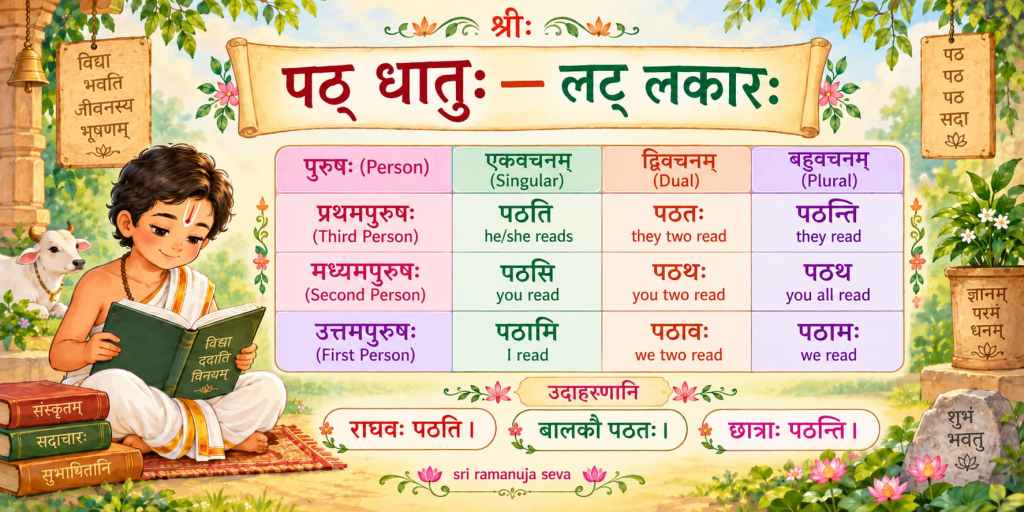
पठति is the प्रथमपुरुष (3rd person) एकवचन (singular) लट् लकार (present tense) form of पठ् धातु (the verb for reading / studying.)
छात्रः पठति। means “The student reads.” Now, we introduce an object in the sentence. What does the student read? The student reads a book.
“A book” is the object. छात्रः पुस्तकम् पठति।
द्वितीया विभक्ति is used for the object.
पुस्तकम् (book) is the object in the sentence.
पुस्तकम् is the द्वितीया विभक्ति एकवचन form of पुस्तक .
In English, the order of terms in a sentence is – Subject – Verb – Object.
For example, “The studentreads a book.”
Here, Subject is “The student”
Verb is “reads” .
Object is “a book”.
In languages like Sanskrit, Hindi, Tamil, the order is: Subject – Object – Verb.
छात्रःपुस्तकम् पठति।
Subject (the person doing the action) is छात्रः .
Object (the thing upon which the action is done) is पुस्तकम् .
Verb (the action being performed) is पठति .
Hindi: छात्र पुस्तक पढ़ता है।
Subject (the person doing the action) is छात्र
Object (the thing upon which the action is done) is पुस्तक
Verb (the action being performed) is पढ़ता है
Tamil: மாணவன்புத்தகத்தைப்படிக்கிறான் .
Subject is மாணவன்
Object is புத்தகத்தைப்
Verb is படிக்கிறான்
बालकः फलम् खादति।
English: The boyeats a fruit.
Hindi: लड़का फल खाता है।
Tamil: சிறுவன் பழத்தைச் சாப்பிடுகிறான்.
Subject (person performing the action) is बालकः . Verb (the action being performed) is खादति .
Who eats? The boy eats.
Therefore, “The boy” is the subject.
प्रथमा विभक्ति is used for subject.
बालकः is the प्रथमा विभक्ति एकवचन form of बालक .
What does the boy do? He eats.
“eats” is the verb.
The forms of the subject and verb should match.
बालकः is एकवचन (singular) . Therefore, the एकवचन form of the verb for eating is used.
खादति is the प्रथमपुरुष (3rd person) एकवचन form खाद् धातु (the verb for eating).
We saw the Subject and Verb above. Now, we introduce the Object. What does the boy eat? Fruit. बालकः फलम् खादति।
The object is the thing upon which the action is performed.
द्वितीया विभक्ति is used for the object.
फलम् is the द्वितीया विभक्ति एकवचन form of फल .
In this post, we looked at a couple of examples to understand the construction of simple sentences in Sanskrit. We looked at simple examples of प्रथमा विभक्ति and द्वितीया विभक्ति .
तृतीया विभक्तिः is commonly used with सह , which means “with” or “along with”. We’ll look at a few examples below.
1. श्रीकृष्णः गोपबालैः सह क्रीडति।
Sri Krishna plays with the cowherd boys.
श्रीकृष्ण गोपबालकों के साथ खेलते हैं ।
गोपबालैः सह means “with the cowherd boys”.
The base word is गोपबाल. The तृतीया विभक्तिः बहुवचनम् (plural) form of गोपबाल is गोपबालैः .
The शब्दरूपम् forms of गोपबाल are similar to बालक. (Shabd roop of बालक is given here.) Just as तृतीया विभक्तिः बहुवचनम् form of बालक is बालकैः, similarly the form of गोपबाल is गोपबालैः .
2. गोपबालाः श्रीकृष्णेन सह क्रीडन्ति ।
The cowherd boys play with Sri Krishna.
गोपबालक श्रीकृष्ण के साथ खेलते हैं ।
श्रीकृष्णेन सह means “with Sri Krishna”
श्रीकृष्णेन is the तृतीया विभक्तिः एकवचनम् (singular) form of श्रीकृष्ण .
3. श्रीरामः सीतया सह गच्छति।
Sri Ram goes with Sita.
श्रीराम सीता के साथ जाते हैं ।
सीतया is the तृतीया विभक्तिः एकवचनम् form of सीता . (Shabd roop of सीता is given here. )
4. लक्ष्मणः सीतारामाभ्याम् सह गच्छति।
Lakshman goes with Sita-Ram.
लक्ष्मण सीता-राम के साथ जाते हैं ।
सीतारामाभ्याम् is the तृतीया विभक्तिः द्विवचनम् (dual) form of सीताराम .
5. पिता पुत्रेण सह क्रीडति।
The father plays with the son.
पिता पुत्र के साथ खेलते हैं ।
पुत्रेण is the तृतीया विभक्तिः एकवचनम् form of पुत्र .
6. बालकः मात्रा सह खादति।
The boy eats with the mother.
लडका माता के साथ खाता है ।
मात्रा is the तृतीया विभक्तिः एकवचनम् form of मातृ .
Above we saw examples of a few simple sentences where तृतीया विभक्तिः forms have been used. Specifically, we saw the तृतीया विभक्तिः forms are used along with सह , which means “with” or “along with”.




 sri ramanuja seva